Know which subject needs you
Tag every task to a subject, so "Read Chapter 7" always sits under Chemistry. Your to-do list planner shows where the work is piling up at a glance.
The best free to-do list app for students. Organize study tasks by subject with a daily to-do list, weekly to-do list, priority levels, and due dates. Never forget an assignment, revision session, or deadline again — features cloud sync, free for Android.
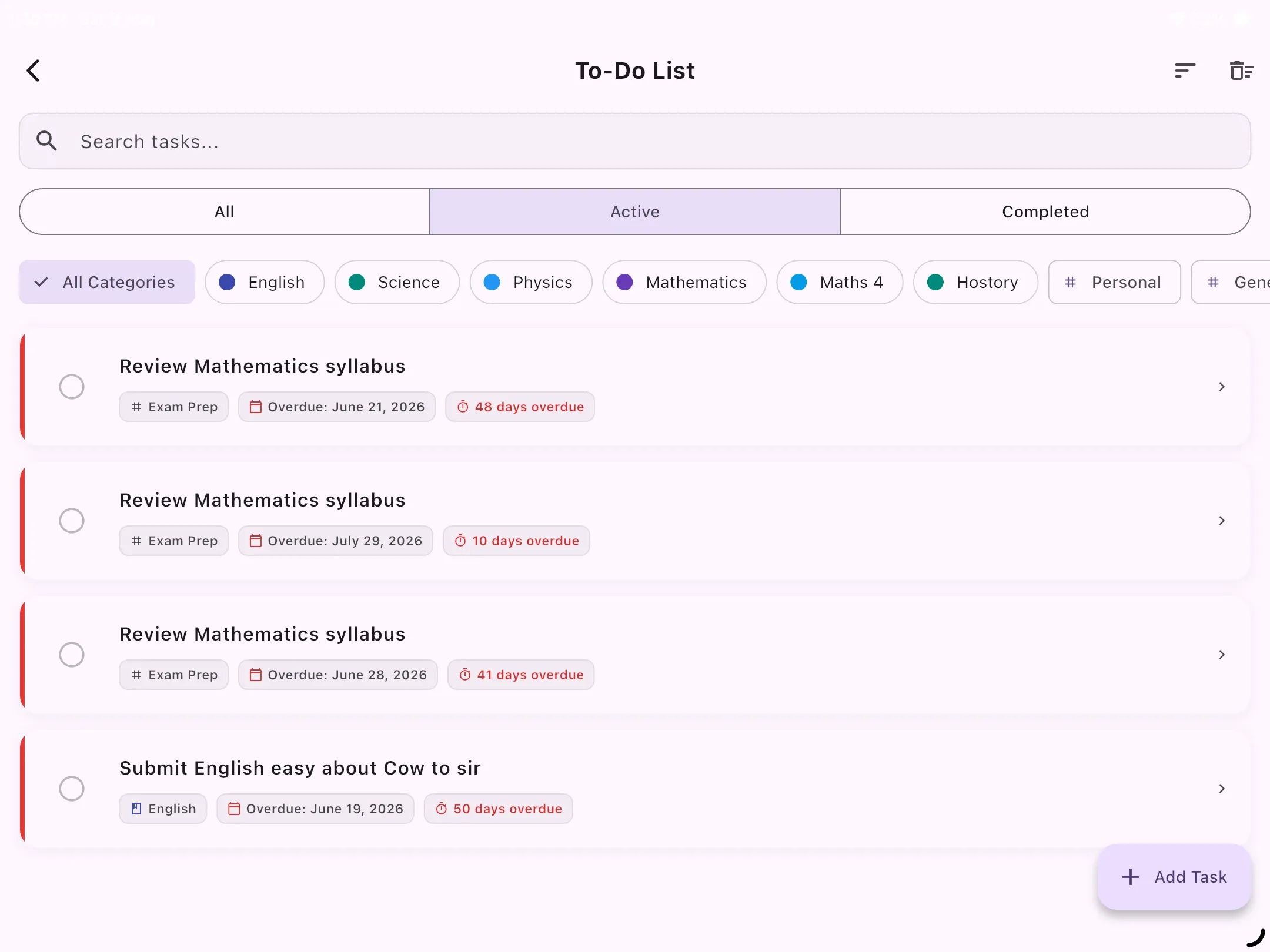
Tablet Preview: Daily & weekly student task list with priority tags and subject organization
A good to-do list takes the worry out of remembering. Homework, practice sheets, revision and deadlines all live in one place, so nothing ends up on a sticky note you'll never find again. Students who keep a daily task list get more done and feel far less overwhelmed, because they always know what comes next.
Our student to-do list is built for exam prep. Every task is tagged to a subject, so "Read Chapter 7" sits under Chemistry instead of floating in a generic list, and a High, Medium or Low priority tells you what to tackle first. Keep your whole weekly to-do list in one place, then tap Today to turn it into a focused daily to-do list of just what needs doing now. Tick a task off and it's archived, so your list stays clean.
Unlike Todoist-style tools, this to-do list app is connected to the rest of your studies. Finish a chapter in your Syllabus Tracker and it can add revision reminders for 3, 7 and 30 days later on its own. It sits right alongside your exam countdown, study planner and Pomodoro timer, making it a complete to-do list planner for exams, all for free.
The best free to-do list for students: every task in one place, sorted by subject and priority, so you always know what to do next.
Tag every task to a subject, so "Read Chapter 7" always sits under Chemistry. Your to-do list planner shows where the work is piling up at a glance.
Mark tasks High, Medium or Low, so when time is short your daily to-do list tells you exactly what to tackle first.
Tap Today to hide everything else and see only what needs doing now. A long list turns into a short, doable one.
Finish a chapter in your Syllabus Tracker and revision to-dos appear for 3, 7 and 30 days later, so nothing you learned slips away.
Tick a task off and it's archived, so your to-do list diary stays clean and every tick feels like progress.
Add a task on your phone and it's there on your other devices. Cloud sync keeps your to-do list app up to date everywhere.
12 things on your list, but only 3 for today. Tap Today to hide the rest and focus on what needs doing now.
Spaced repetition, added to your list for you. You can turn it off in settings, and it steps aside when the Study Planner is scheduling your revision.
Our free student to-do list app organizes tasks by subject, supports daily and weekly views, due dates, and priority levels — integrated with your exam countdown and study planner. No other free to-do list app is purpose-built for student exam prep like this one.
Yes. Switch between daily and weekly task views. Use the daily to-do list for what needs doing today, and the weekly to-do list to plan ahead for the whole week across all your subjects.
Yes, a to-do list desktop app for Windows is available for free. The Android version is also available for free.
Yes. The to-do list app features cloud multi-device sync, keeping your tasks up-to-date everywhere.
Absolutely. Use it as a to-do list diary that logs your daily and weekly study tasks, or as a to-do list planner that organizes upcoming work by subject and due date. It functions as a complete student task management system.
Download the best free to-do list app for students. Start your first daily task list today.
↓ Download Free