Home Screen Widgets & Utility Tools
Check your exams, subject progress, and study streaks instantly with home screen widgets for Android & iOS. Plus, customize your study experience in the More Tab with digital ID cards, rich text notes, dark themes, drag-and-drop syllabus management, AI model settings, local backups, and support for 10 global languages.
Track progress without opening the app.
Stay on top of your study schedule. Glanceable home screen widgets directly on Android and iOS.
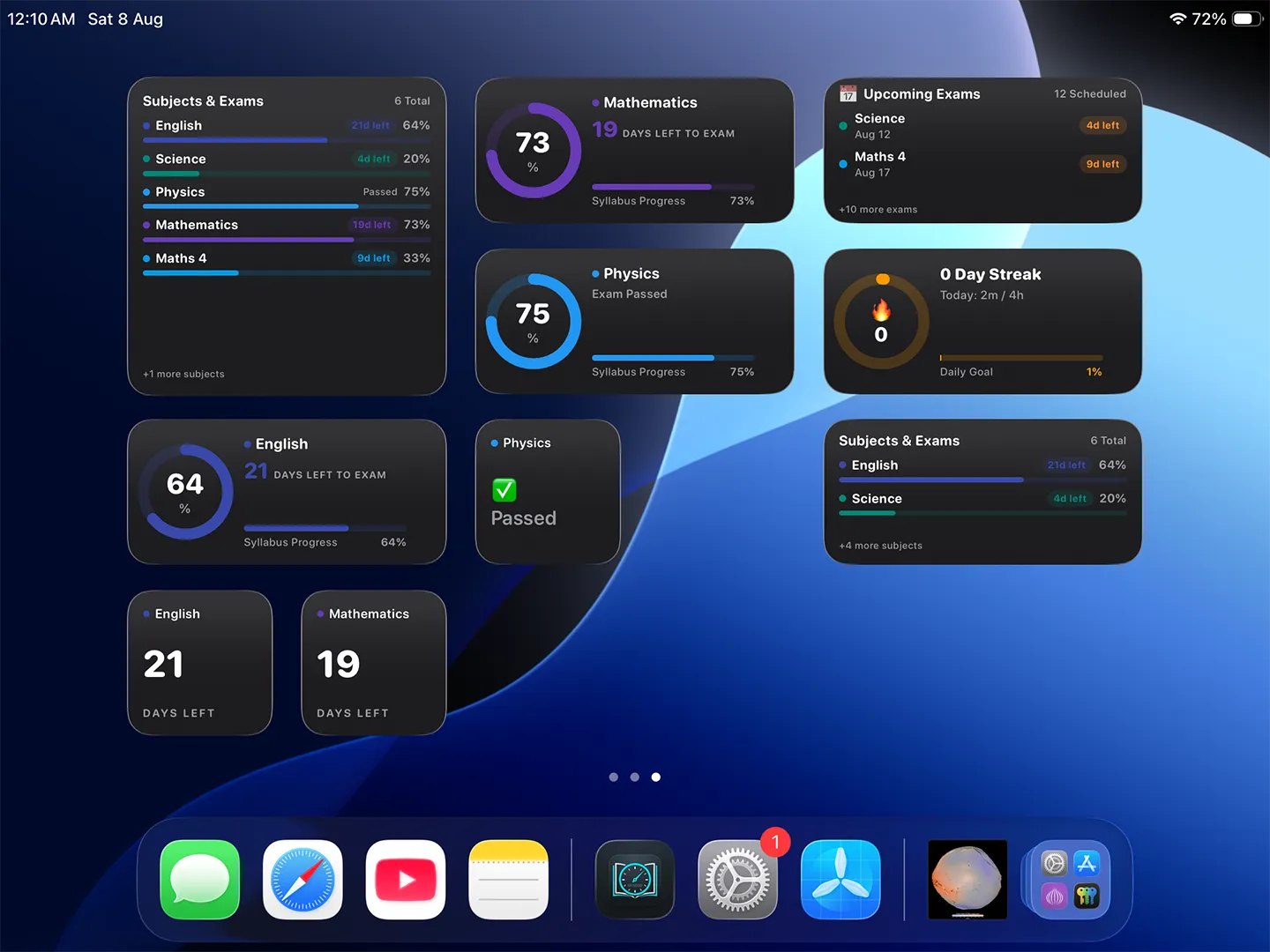
Home Screen Widgets for Android & iOS: Glanceable widgets for exam countdowns, subject progress, upcoming tests, and daily streaks
- Upcoming Exam widgetKnow what's next without opening the app: your nearest exam and the days left.
- Subject Progress widgetSpot the subject that's falling behind, with each subject's completion at a glance.
- Exam Countdown widgetEvery unlock is a reminder: days, hours and minutes to the exam that matters most.
- Daily Streak widgetKeep your study streak alive, one glance at a time.
All tools & preferences in one place.
The More Tab provides essential student utilities, personalized settings, privacy controls, and data protection.
Set it up the way you study.
Dark, Light & System themesEasy on your eyes during late-night study.
10 languagesUse the app in the language you think in.
- Class
- 10
- Roll No
- 24
- Reg. No
- 2026-10-0421
Student ID CardYour institute, class, roll and registration number, always to hand.
Your syllabus, in the order that makes sense to you.
- ⋮⋮Motion
- ⋮⋮Refraction
- ⋮⋮Forces
Drag & drop syllabusAdd, rename and reorder subjects and chapters with a simple drag.
Snell's law: n₁ sin θ₁ = n₂ sin θ₂
- Light slows down in glass
- Critical angle → total internal reflection
Rich text chapter notesKeep formulas and key points right inside each chapter, ready for revision.
Mistakes are fixable, and your data is yours.
Recycle BinDeleted a subject or chapter by mistake? Restore it within 10 days.
Local backupSave everything to a JSON file and restore it anytime, no cloud needed.
Privacy controlsLog out in one tap, or permanently delete your stored data.
Frequently Asked Questions
Are home screen widgets supported on Windows?
Home screen widgets are currently supported on Android and iOS devices. You can place widgets for upcoming exams, subject progress, countdowns, and daily streaks directly on your phone or tablet home screen. On Windows, all stats are visible inside the main app dashboard.
What languages can I use in the Study Planner app?
The app supports 10 languages: English, Hindi, Arabic, Spanish, Bengali, Portuguese, Indonesian, Vietnamese, French, and Turkish. You can change your language anytime from the More tab settings.
How does Local Export and Import work without cloud sync?
If you prefer not to use cloud sync, you can tap "Export Data" in the More tab to download a complete JSON backup file of all your exams, subjects, chapters, to-do items, and notes to your local storage. You can tap "Import Data" anytime to restore this file.
What is the difference between AI models (Tutor, Professor, Assistant)?
In the AI Assistant settings, Tutor provides balanced, clear guidance for daily study; Professor offers deep, thorough explanations for complex academic subjects; and Assistant delivers rapid, concise answers for quick planning tasks.
Can I recover subjects or chapters that I deleted by accident?
Yes. Any deleted subject or chapter goes into the app's Recycle Bin for 10 days. Open the Recycle Bin from the More tab and restore it with a single tap. After 10 days, items are permanently deleted.
Unlock the ultimate student productivity suite.
Download the free app for Android, iOS, or Windows today.
↓ Download Free